블로그 이미지
Every unexpected event is a path to learning for you. blueasa

카테고리

분류 전체보기 (2858)
Unity3D (897)
Script (94)
Extensions (16)
Effect (3)
NGUI (81)
UGUI (9)
Physics (2)
Shader (43)
Math (1)
Design Pattern (2)
Xml (1)
Tips (204)
Link (26)
World (1)
AssetBundle (25)
Mecanim (2)
Plugins (87)
Trouble Shooting (71)
Encrypt (7)
LightMap (4)
Shadow (4)
Editor (12)
Crash Report (3)
Utility (9)
UnityVS (2)
Facebook SDK (2)
iTween (3)
Font (18)
Ad (14)
Photon (2)
IAP (1)
Google (12)
URP (5)
Android (54)
iOS (47)
Programming (479)
Server (33)
Unreal (4)
Gamebryo (56)
Tip & Tech (192)
협업 (64)
3DS Max (3)
Game (12)
Utility (142)
Etc (99)
Link (34)
Portfolio (19)
Subject (90)
iOS,OSX (53)
Android (16)
Linux (5)
잉여 프로젝트 (2)
게임이야기 (3)
Memories (20)
Interest (38)
Thinking (38)
한글 (30)
PaperCraft (5)
Animation (408)
Wallpaper (2)
재테크 (19)
Exercise (3)
나만의 맛집 (3)
냥이 (10)
육아 (16)
Total
Today
Yesterday

[펌] MCC/MNC

Unity3D/Tips / 2016. 11. 30. 15:47

MCC(Mobile Country Code)와 MNC(Mobile Network Code) 쌍은 통신사를 구분하기 위한 국가-통신사 코드 조합으로 우리나라에서 많이 쓰이는 CDMA, LTE 이외에 GSM, UMTS, TETRA 등에서도 사용된다. ITU-T에서 E.212를 통해 MCC/MNC를 제안했으며, 요즘은 보통 USIM에서 위 값의 조합을 가져올 수 있다.

안드로이드의 경우, SYSTEM PROPERTIES 중 하나인 gsm.operator.numeric에서 MCC+MNC 조합인 PLMN ID를 가져올 수 있다.

만약 3자리 이상이라면, 앞의 3자리가 MCC 그 나머지를 MNC로 보면 된다.  위의 23410의 경우, 영국(234)의 O2 통신사(10)이다.

MCC를 얻는 함수 예제는 아래와 같다.

그럼 MCC/MNC는 어디에 쓸까? 보통의 서비스들은 다국어 번역만 지원하고 사용자가 셋팅에서 언어를 바꿀 수 있게 하면 된다.

하지만, 구글 플레이 스토어나 애플의 앱스토어처럼 국가마다 다른 앱이나, 캠페인을 진행하고 싶은 경우 MCC를 참조할 수 있다. 그리고 간혹 통신사만의 캠페인을 진행하는 경우 MNC를 참조할 수 있다.

그런데 왜 번거롭게 USIM의 MCC/MNC를 이용해서 서비스를 다르게 보여주려고 할까? 사용자가 접속하고자 하는 국가를 고르면 되는 것 아닌가?

마켓의 경우는 앱을 다운로드 받기 때문에 단말이 네트워크에 연결되어 있어야 한다. Wi-Fi가 아니라면 통신사 망을 통해 데이터를 전송하기 때문에  USIM의 값이 중요하다. 그리고,  USIM을 구입할 나라라면 사용자가 더 거주할 확률이 높다고 판단하기 때문으로 보인다. 마지막으로, 신용카드 결제가 아닌 핸드폰 요금에 청구되는 소액결제의 경우(P-SMS와 캐리어 빌링이 대표적이다) USIM의 통신사에 따라 결제 여부가 달라지기 때문에 마켓에서는 USIM의 데이터를 더 신뢰한다.

클래시 오브 클랜처럼 게임을 만든다면 다국어 번역만 지원하고 사용자의 현재 언어를 파악하여 언어를 보여주거나 사용자가 셋팅에서 스스로 바꿀 수 있는 방법만 제공하면 되겠다. 애플이나 구글의 인앱결제들이 어떻게든 결제를 할 수 있게 고민할테니 말이다.

그 밖에

MCC/MNC는 USIM에 저장되어 있기 때문에, USIM을 따라다닌다. 단말을 구분하고 싶다면 IMEI 값을 참고하자. 2012년 5월부터는 완전히 공개된 정보가 되어 단말의 뒷면(배터리 탈착 부분)에서 확인할 수 있다.

참조


[출처] http://sunphiz.me/wp/archives/1047

반응형
Posted by blueasa
, |


[유니티5.x 기준 경로] 드라이브:\Users\{계정명}\AppData\Roaming\Unity\Asset Store-5.x


[참조] http://neojsm.tistory.com/8

반응형

'Unity3D > Tips' 카테고리의 다른 글

[펌] 안드로이드 mcc mnc 읽어오기  (0) 2016.11.30
[펌] MCC/MNC  (0) 2016.11.30
[펌] Borderless window in standalone player  (0) 2016.11.08
[펌] Disable Screen Auto Rotation on Unity3D  (0) 2016.11.03
[링크] Unity Technologies  (0) 2016.11.01
Posted by blueasa
, |
Best Answer

Answer by clunk47 

Of course it's easy. I do it by creating a shortcut or batch file that starts the exe, instead of running the exe file. For example, a batch file. This is just an example, so say our EXE name is RUN.EXE. You would open Notepad, type the following:

start RUN.EXE -popupwindow

Then File> Save as> and in the filename where it says .txt originally, just remove that and use an asterick and a bat extension (*.bat) Hit ENTER, then it will know you want to save as a bat file. Now just type in a name like Launcher.bat, don't forget to remove the asterick but keep the .bat extension. Now you would run this Launcher file. The argument -popupwindow is what allows your Unity Standalone EXE to run without borders :D


[출처] http://answers.unity3d.com/questions/13009/borderless-window-in-standalone-player.html

반응형
Posted by blueasa
, |

[추가]

Landscape은 아래 2개 변수를 제어


Screen.autorotateToLandscapeLeft

Screen.autorotateToLandscapeRight


Disable screen auto-rotation in a game in Unity. 

Option 1


Create a script that disables auto rotate to portrait and sets the orientation to landscape.

using UnityEngine;

public class CameraScript : MonoBehaviour {

    void Start() {
        DisableAutoRotation ();
    }

    public void DisableAutoRotation() {
        Screen.autorotateToPortrait = false;
        Screen.autorotateToPortraitUpsideDown = false;
        Screen.orientation = ScreenOrientation.Landscape;
    }
}


Create a game object to attach the script to. This can be any game object. You could also attach the script to the main camera in the scene either. When the game is run on hand held devices, the autorotation will be disabled.

Option 2


Another solution to this problem is to change this setting when building the project. 
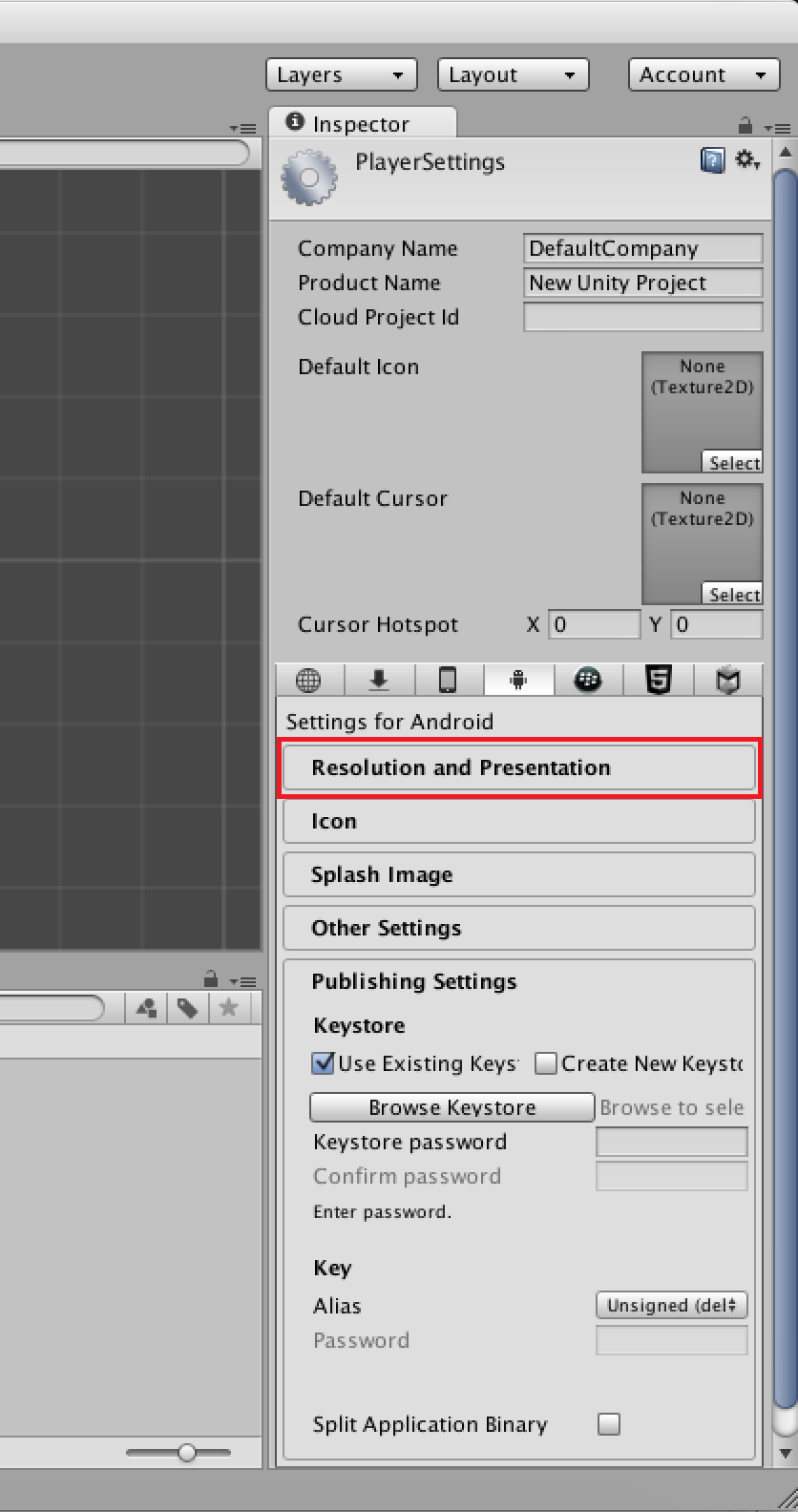
Go to 
File -> Build Settings...


Click on Player Settings...


Click on Resolution and Presentations panel in the inspector. This will then expand and present more options.


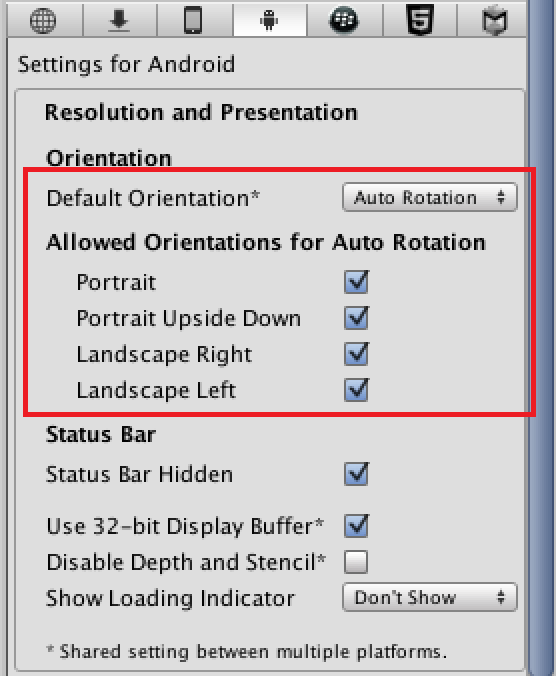
In the Resolution and Presentation panel there are options for configuring the orientation.
First select the default Orientation. This is the orientation that the game will start in. 
You can configure what orientations are allowed when the game is being run. To do this, check or uncheck the required boxes for "Allowed Orientations for Auto Rotation".


[출처] http://andrewstutorialblog.blogspot.kr/2014/12/disable-screen-auto-rotation-on-unity3d.html

반응형
Posted by blueasa
, |


[링크] https://bitbucket.org/Unity-Technologies/


[참조] https://youtu.be/iRZoYI1NUmM

반응형
Posted by blueasa
, |

최적화 Tips

GameObject를 비활성화

필요한 경우가 아니면 GameObject를 비활성화 해라. 개체수를 감소시켜라.

Scripts를 비활성화

필요한 경우가 아니면 Scripts를 비활성화 해라.

콜백(Update, OnEnable등) 함수의 사용을 자제하자

  • 새로운 스크립트를 생성시에 Update가 생성되는데 불필요한 경우 삭제하자. 그리고 Update에서 꼭 처리해야 하는 경우가 아니면 다른 방법으로 해결하라.
  • Coroutine을 적극 활용해라. Update함수 대신에 Coroutine을 사용할 수 있는 경우는 적극 활용하자. FadeIn/Out 같은 경우 단기간 필요한 기능이므로 코루틴으로 만들 경우 일시적으로 부하가 발생하므로 Update처럼 지속적으로 부하를 일으키지 않는다.

Find류 GetComponent류 함수의 호출 횟수를 줄이자

Find, FindByTag, GetComponent류의 사용을 자제해야 한다. 특히 Update, FixedUpdate같은 곳에서 지속적으로 사용하는 것은 퍼포먼스에 악영향이 있다. Awake, OnEnable에서 미리 찾아서 가지고 있는 것이 좋다.

유니티 엔진에서 제공하는 속성에 접근시 부하 발생

Transform.position, gameObject.transform, gameObject.camera 등 유니티 엔진에서 C# 프로퍼티로 랩핑하여 제공하는 변수 타입에 접근시에 부하와 임시 객체가 생성된다. 캐싱하여 사용하는 것이 좋다.

태그 비교시에 if ( go.tag == “myBot” ) 구문 대신에 go.compareTag(“myBot”)을 사용하는 것이 임시 객체 생성을 회피하는 방법이다.

LINQ 명령어 사용 자제

LINQ 명령어를 사용하는 경우 중간 버퍼가 할당된다. 이는 가비지로 남게 된다.

박싱 언박싱 회피

꼭 필요한 경우가 아니면 SendMessage를 사용하지 말라

SendMessage류의 사용을 자제해야 한다. 직접 함수를 호출하는 경우보다 SendMessage류를 사용하는 경우 100배 느리다. 그리고 호출시에 함수 이름을 넣게 되는데 코드 난독화가 필요한 경우 장애요소가 된다.

foreach() 사용을 자제하자

foreach()를 사용할 경우 enumerator를 생성하기 위해서 힙 메모리를 할당한다. for(;;)문을 활용하는 것이 좋다. 한번 돌 때마다 24bit의 가비지를 남긴다.

문자열

  1. string을 그대로 사용해서 조합 하는 것 보다 StringBuilder를 사용하는 것이 좀더 메모리 친화적이고 퍼포먼스 업에 도움이 된다.
  2. 혹은 String.Format을 사용하자.
  3. 상수 타입 문자열은 const, readonly를 지정하여 가비지 컬렉션에서 제외시키자.


[출처] http://www.antegg.com/wiki/doku.php?id=note:unity_3d:%EC%B5%9C%EC%A0%81%ED%99%94_tips

반응형
Posted by blueasa
, |

다른 오브젝트의 함수를 써야할 때 메시지 호출방법을 쓰는 것이 좋다고 합니다.


이득우 님의 발표자료에 따르면, (아래 화면 참조)

  • 메시지 호출은 클래스 간 의존성을 줄일 수 있고,
  • 이는 코드를 간단하게 만들 수 있는데,
  • 성능의 저하가 있다고 생각하지만 그렇게 느리지 않고 장점이 더 크니 적극적으로 쓰자.
는 결론입니다.

<컴포넌트>.SendMessage 또는 <게임오브젝트>.SendMessage 와 같은 방식으로 쓸 수 있습니다.

구문 형식:
void SendMessage(string methodName, object value = null, SendMessageOptions options = SendMessageOptions.RequireReceiver); 


유니티 레퍼런스 홈페이지 예제를 보면,


using UnityEngine;

using System.Collections;


public class Example : MonoBehaviour {

    void ApplyDamage(float damage) {

        print(damage);

    }

    void Example() {

        SendMessage("ApplyDamage", 5.0F);

    }

}


위와 같은 방식으로 사용하고 있습니다. 파라미터 중 마지막 SendMessageOptions 은 말 그대로 옵션인데, SendMessageOptions.DontRequireReceiver 라고 쓸 경우에는 호출한 함수가 제대로 호출되었는지 여부는 신경쓰지 않고 호출한 것으로 역할이 끝납니다.


C# 에서는 콜백의 기능을 위해 delegate 를 사용할 수도 있습니다. 이와 관련해서 아래의 링크를 참고하세요.


http://unityindepth.tistory.com/entry/유니티-개발자로써-내가-배웠던-최고의-5가지


[출처] http://unitygame.tistory.com/entry/%EC%9C%A0%EB%8B%88%ED%8B%B0-SendMessage-%EC%82%AC%EC%9A%A9


[첨부]


빕스

덧붙이자면 
SendMessage 도 생각보다 느리지 않다고 알고있습니다.

실시간으로 리플랙션을 통해 함수를 호출하는것이 아니라
엔진에서 맵형태로 관리하기때문에
스트링 비교하는 부하정도만 있는걸로 알고있습니다.


[출처] http://www.gamecodi.com/board/zboard.php?id=GAMECODI_Talkdev&no=2070

반응형
Posted by blueasa
, |

Optimization Technique :

Let’s take an example, and see why and where we can optimise. Below  Coroutine just waits for the 0.5 sec and then call your desired method.

1
2
3
4
5
6
7
8
9
IEnumerator WaitCoroutine()
 
{
 
yield return new WaitForSeconds(0.5f);
 
// Call your Method here
 
}


But every time you call this method “new WaitForSeconds(0.5f)” will allocate memory for the new object, which is not good.

Instead, we should save its reference in Start, and use it when it is required, In this way, we will not allocate memory on every call.

01
02
03
04
05
06
07
08
09
10
11
12
13
14
15
WaitForSeconds wait;
 
void Start()
{
  wait = new WaitForSeconds(0.5f);
}
  
IEnumerator WaitCoroutine()
{
 
    yield return wait;
 
// Call your Method here
 
}

Never use “yield return 0“, instead of that use “yield return null


[출처] http://www.unitygeek.com/coroutines-in-unity3d/

반응형
Posted by blueasa
, |

UNITY가 Play도중에 죽는 경우가 자주 발생하기 때문에 아래와 같이 Play를 감지하여 Assets을 저장하도록 하면 저장을 하지 못해서 편집한 내용이 유실되는 상황을 방지 할 수 있다.

using System.Collections;
using UnityEditor;
using UnityEngine;
 
[InitializeOnLoad]
public class SaveAssets
{
	static SaveAssets()
	{
		EditorApplication.playmodeStateChanged = () =>
		{
			if (EditorApplication.isPlayingOrWillChangePlaymode)
			{
				EditorApplication.SaveAssets();
			}
		};
	}
}


[출처]

http://www.antegg.com/wiki/doku.php?id=note:unity_3d:%EC%97%90%EB%94%94%ED%84%B0%EC%97%90%EC%84%9C_%EA%B2%8C%EC%9E%84_%ED%94%8C%EB%A0%88%EC%9D%B4%EB%A5%BC_%ED%95%A0_%EB%95%8C_%EC%A0%80%EC%9E%A5%EB%90%98%EC%A7%80_%EC%95%8A%EC%9D%80_assets_%EC%A0%80%EC%9E%A5%ED%95%98%EA%B8%B0


[참조]

https://docs.unity3d.com/ScriptReference/EditorApplication.SaveAssets.html

반응형
Posted by blueasa
, |

Objective

The main objective of this post is to Keep you updated with the latest optimization Techniques for Games developed in Unity.


Your game lags?
Players unhappy?
don't know what to do?

Well the answer is, your game needs "OPTIMIZATION !"

"Optimization is every important part while developing any game, As exciting and challenging as this may be, it makes it difficult for developers to get the information they need."

I found it almost impossible to get hold of information about techniques and algorithms that real developers used in their Optimized games. There is usually an atmosphere of secrecy about the coding techniques in top studios.

We realized that the time spent on optimizing a game is quite high, and decided that it is high time to share to the world of game developers, what we know about this important process.

So we have taken up an initiative and share valuable tips every day, and keep the community updated. we would also be very happy to welcome your ideas and techniques for the same.

Let us create an open community, and together move forward towards developing high quality AAA titles. :D


- See more at: http://www.theappguruz.com/blog/unity-optimization-initiative#sthash.0YKWVMH2.dpuf


[출처] http://www.theappguruz.com/blog/unity-optimization-initiative

반응형
Posted by blueasa
, |