블로그 이미지
Every unexpected event is a path to learning for you. blueasa

카테고리

분류 전체보기 (2862)
Unity3D (899)
Programming (479)
Server (33)
Unreal (4)
Gamebryo (56)
Tip & Tech (192)
협업 (65)
3DS Max (3)
Game (12)
Utility (142)
Etc (99)
Link (34)
Portfolio (19)
Subject (90)
iOS,OSX (53)
Android (16)
Linux (5)
잉여 프로젝트 (2)
게임이야기 (3)
Memories (20)
Interest (38)
Thinking (38)
한글 (30)
PaperCraft (5)
Animation (408)
Wallpaper (2)
재테크 (20)
Exercise (3)
나만의 맛집 (3)
냥이 (10)
육아 (16)
Total
Today
Yesterday

[링크] https://drybone-developer.tistory.com/72


[폰트] 서브셋 경량화, WOFF 변환 + 상용 한글, 제1수준 한자, 특수기호

요즘 자꾸 딴짓만하네 하지만 어쩌겠어요 전 오늘도 제가 하는 게임들에서 이벤트 총을 동시에 네 발이나 맞았어요 (?) 여튼 어제 쓴 글에서 이어지..기도 하는? 글입니다. [WOFF / CSS] 글자 사라짐(

drybone-developer.tistory.com


-----------------------------------------------------------------------------------------------------------------

일본어_제1수준_한자.txt
0.01MB
한글_2350자.txt
0.01MB
한글_특수기호.txt
0.00MB

반응형
Posted by blueasa
, |

[링크]

https://yespickbible.tistory.com/entry/iOS-%EB%B0%8F-iPadOS%EC%97%90%EC%84%9C-%EB%AA%A8%EB%93%A0-%EC%84%A4%EC%A0%95-%EB%93%A4%EC%96%B4%EA%B0%80%EB%8A%94-%EB%8B%A8%EC%B6%95%EC%96%B4-%EB%AA%A8%EC%9D%8C


iOS 및 iPadOS에서 모든 설정 들어가는 단축어 모음

단축어를 통해 설정 앱의 특정 화면을 실핼할 수 있는데 그 URL을 모아보았다. 이는 IOS 및 iPadOS 13.1에서 지원된다. 이 기능을 사용하려면 'URL 열기' 작업을 사용하면 되는데 단축어 설명 및 사용되

yespickbible.tistory.com


반응형
Posted by blueasa
, |

[링크] https://green1229.tistory.com/438


Firebase App Distribution으로 앱 배포하기

안녕하세요. 그린입니다 🍏 이번 포스팅에서는 Firebase App Distribution을 이용해 앱을 배포하는 방법에 대해 알아보겠습니다 🙋🏻 그럼 우선 Firebase App Distribution이 뭔지부터 알고 갈까요? Firebase Ap

green1229.tistory.com


반응형
Posted by blueasa
, |

[CPU] i7-10700

[Version] ThrottleStop 9.6

----


[2025-03-13] 9.7 버전에서 옵션이 달라져서 일단 아래에서 셋팅했던 버전을 올려둔다.

ThrottleStop_9.6.zip
1.70MB


----

회사에서 일한다고 Unity 2개정도 켜고, Visual Studio 켜고 좀 하다보면 가끔 컴퓨터가 아무런 전조증상도 없이 Freezing 된다.

팀원 도움으로 확인해보니 CPU 온도가 100°C를 치고 있는데 더 심해지면 그냥 뻗어버리는 것 같다.

그래서 CPU 온도 제한 방법을 듣고 셋팅 후, 컴퓨터 안뻗는 것 확인하고 정리함.


대충 순서는 아래와 같다.

1. ThrottleStop으로 CPU 최대 온도 제한

2. (직접 수동으로 켜기 귀찮으니..)Windows 부팅 시, ThrottleStop 자동 실행하도록 설정(작업 스케쥴러 사용)

-----------------------------


    [ThrottleStop으로 CPU 최대 온도 제한] ThrottleStop 9.6 버전 기준

1) ThrottleStop 다운로드(https://www.techpowerup.com/download/techpowerup-throttlestop/

2) ThrottleStop 적당한 위치에 압축을 푼 뒤, 'ThrottleStop.exe 실행'

3) 'ThrottleStop-Options' 클릭


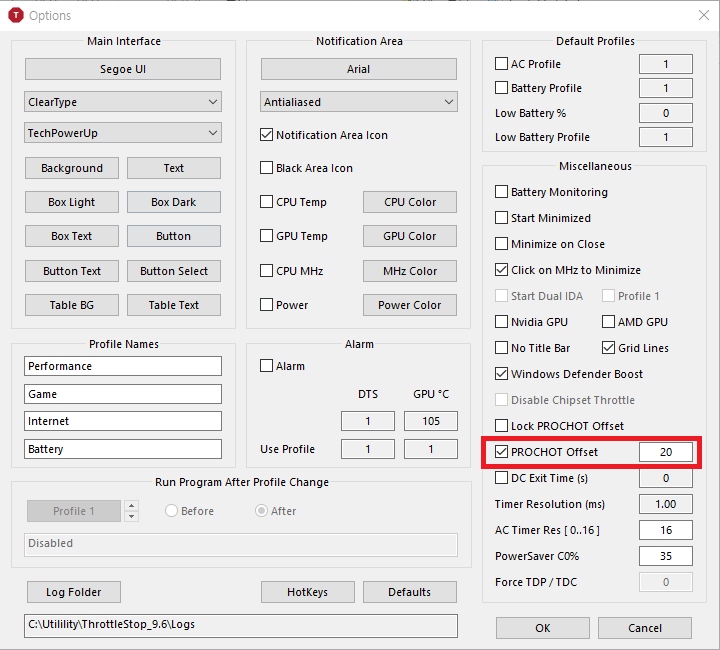
4) 'Options - PROCHOT Offset'에 값 추가([참조 : https://m.blog.naver.com/svenwolf/221912830871)

    4-1) 값 기준 : 100도 기준 지정값을 뺀 온도치를 최대 쓰로틀링 제한값으로 지정

    4-2) 예: 20 넣으면 100 - 20 = 80(80도에서 쓰로틀링 제한)


    [ThrottleStop 자동 실행하도록 설정(작업 스케쥴러 사용)]

[링크] https://detailedmanual.net/throttlestop-%EC%9E%90%EB%8F%99%EC%8B%9C%EC%9E%91-%EB%B0%A9%EB%B2%95/


ThrottleStop(쓰로틀스탑) 자동시작 방법 - Detailed Manual

노트북의 성능을 향상하기 위해 ThrottleStop(쓰로틀스탑)이라는 프로그램을 사용하는 경우가 많다. 이 프로그램은 CPU의 전압을 낮춰주는 언더볼팅과 속도를 높여주는 오버클럭을 할 수 있게 해준

detailedmanual.net


[참조] https://m.blog.naver.com/svenwolf/221912830871


쓰로틀스탑 메뉴의 이해

#쓰로틀스탑 #발열제어 #인텔 #9750H #ASUS #ROG #G731GW발열 주메뉴(이전 8.76버전 기술되었던...

blog.naver.com


반응형
Posted by blueasa
, |

[링크] https://toconakis.tech/ios-sign-in-with-apple/


【Unity】iOSでSign in with Appleの実装を解説|toconakis.tech

UnityでiOS向けのSing in with Appleを実装し、FirebaseAuthと連携していく方法を解説し

toconakis.tech


반응형
Posted by blueasa
, |

[링크] https://toconakis.tech/glassmorphism/


【Unity】すりガラス風UIの作り方を解説 -グラスモーフィズム-|toconakis.tech

現在開発中の個人開発ゲーム「EUREKA5」で使っている「すりガラス風UI」の作り方を解説します。   EUR

toconakis.tech


Shader "glassShader"
{
    Properties
    {
        _MainTex("Texture", 2D) = "white" {}
        _Blur("Blur", Float) = 10
    }
    SubShader
    {

        Tags{ "Queue" = "Transparent" }

        GrabPass
        {   
        }

        Pass
        {
            CGPROGRAM

            #pragma vertex vert
            #pragma fragment frag
            #include "UnityCG.cginc"

            struct appdata
            {
                float4 vertex : POSITION;
                float2 uv : TEXCOORD0;
                fixed4 color : COLOR;
            };

            struct v2f
            {
                float4 grabPos : TEXCOORD0;
                float4 pos : SV_POSITION;
                float4 vertColor : COLOR;
            };

            v2f vert(appdata v)
            {
                v2f o;
                o.pos = UnityObjectToClipPos(v.vertex);
                o.grabPos = ComputeGrabScreenPos(o.pos);
                o.vertColor = v.color;
                return o;
            }

            sampler2D _GrabTexture;
            fixed4 _GrabTexture_TexelSize;

            float _Blur;

            half4 frag(v2f i) : SV_Target
            {
                float blur = _Blur;
                blur = max(1, blur);

                fixed4 col = (0, 0, 0, 0);
                float weight_total = 0;

                [loop]
                for (float x = -blur; x <= blur; x += 1)
                {
                    float distance_normalized = abs(x / blur);
                    float weight = exp(-0.5 * pow(distance_normalized, 2) * 5.0);
                    weight_total += weight;
                    col += tex2Dproj(_GrabTexture, i.grabPos + float4(x * _GrabTexture_TexelSize.x, 0, 0, 0)) * weight;
                }

                col /= weight_total;
                return col;
            }
            ENDCG
        }
        GrabPass
        {   
        }

        Pass
        {
            CGPROGRAM

            #pragma vertex vert
            #pragma fragment frag
            #include "UnityCG.cginc"

            struct appdata
            {
                float4 vertex : POSITION;
                float2 uv : TEXCOORD0;
                fixed4 color : COLOR;
            };

            struct v2f
            {
                float4 grabPos : TEXCOORD0;
                float4 pos : SV_POSITION;
                float4 vertColor : COLOR;
            };

            v2f vert(appdata v)
            {
                v2f o;
                o.pos = UnityObjectToClipPos(v.vertex);
                o.grabPos = ComputeGrabScreenPos(o.pos);
                o.vertColor = v.color;
                return o;
            }

            sampler2D _GrabTexture;
            fixed4 _GrabTexture_TexelSize;

            float _Blur;

            half4 frag(v2f i) : SV_Target
            {
                float blur = _Blur;
                blur = max(1, blur);

                fixed4 col = (0, 0, 0, 0);
                float weight_total = 0;

                [loop]
                for (float y = -blur; y <= blur; y += 1)
                {
                    float distance_normalized = abs(y / blur);
                    float weight = exp(-0.5 * pow(distance_normalized, 2) * 5.0);
                    weight_total += weight;
                    col += tex2Dproj(_GrabTexture, i.grabPos + float4(0, y * _GrabTexture_TexelSize.y, 0, 0)) * weight;
                }

                col /= weight_total;
                return col;
            }
            ENDCG
        }

    }
}
반응형
Posted by blueasa
, |

[링크] https://toconakis.tech/unity-ios-google-sign-in/


【Unity】iOSネイティブ連携でGoogle Sign Inを実装する方法|toconakis.tech

UnityでGoogle Sign Inを実装する場合、Google公式のライブラリを利用するのが一般的です。 [blo

toconakis.tech


반응형
Posted by blueasa
, |

[Unity] JDK 11 support

Unity3D/Tips / 2024. 6. 4. 10:50

Unity 2021.3.38f1

Unity 2021.3.40f1

----


[추가] 2024-07-11

Unity 2021에서 Android Target API 34 적용(https://blueasa.tistory.com/2838)하고, Firebase 12 이상 버전을 업뎃해서 빌드 테스트 해보니 잘된다.

결국 Android Target API 34에 물린 문제인가 싶다.


----

Firebase 12.0.0을 업뎃하려고 보니 Authentication쪽에서 JDK 11을 요구한다.

Unity 2021에서 JDK 11을 사용하려고 별도로 다운받아서 연결해서 빌드해보니, Unity 2021에서는 JDK 1.8만 사용가능하다면서 에러가 뜬다.


그래서 찾아보니 JDK 11은 Unity 2022.3 이후 버전부터 지원하는 것 같다.

결국 Firebase 12.0.0(정확히는 Authentication)를 사용하려면. JDK 11을 지원하는 Unity 2022.3 이후 버전으로 올려야 될 것 같다.


Unity 2021 버전은 Firebase 11.9.0이 마지막 버전인가.. 싶다.


[링크] https://forum.unity.com/threads/jdk-11-support.1261301/


Question - JDK 11 support

Starting API 31, JDK 11 is a requirement due to addition of new annotations used by some of the dependencies. If I try to target api 31, it fails with...

forum.unity.com


[참조]

  • Unity Editor 2022.2 미만 버전은 JDK 8만 지원한다. 해당 버전의 Unity Editor를 쓴다고 해서 Android Studio도 반드시 JDK 8을 써야 하는 건 아니지만, 혹시나 JDK 관련 에러가 다른 방법으로 고쳐지지 않을 경우 스튜디오 버전을 4.1.x로 내리는 것을 시도해보면 좋을 것 같다. 참고 공식문서

[참조링크] https://velog.io/@maratangsoft/Android%EC%99%80-Unity-%EA%B0%84-Gradle-%EB%B2%84%EC%A0%84-%EA%B4%80%EB%A6%AC#unity--jdk


Android와 Unity 간 버전 호환성 관리

유니티 에디터로 만든 안드로이드 앱에 안드로이드 라이브러리 통합시

velog.io


반응형
Posted by blueasa
, |


[링크] https://github.com/danielshervheim/unity-stylized-water


GitHub - danielshervheim/unity-stylized-water: A stylized water shader (and material presets) for Unity.

A stylized water shader (and material presets) for Unity. - GitHub - danielshervheim/unity-stylized-water: A stylized water shader (and material presets) for Unity.

github.com


반응형
Posted by blueasa
, |

[Github] https://github.com/Unity-Technologies/com.unity.editoriterationprofiler


GitHub - Unity-Technologies/com.unity.editoriterationprofiler: Assists in capturing frames from the Profiler of Domain Reloads i

Assists in capturing frames from the Profiler of Domain Reloads in the Unity Editor. Compatible with Unity 2019.3+. - Unity-Technologies/com.unity.editoriterationprofiler

github.com

--------------------------------------------------------------


Editor Iteration Profiler (EIP)
Before diving into the details, I will start by defining what an iteration is. An iteration is a process that contains instructions that are repeated until a condition is met. Unity relies on different types of iterations.

The Editor Iteration Profiler monitors iterations that are related to the scripting side of Unity, specifically entering and exiting playmode, assembly compilation, and assembly reload.

The tool is an attempt to empower you, our users, to understand and help you solve the common question “Why does it take so long to compile my scripts/enter playmode?”. EIP accomplishes this by monitoring profiler frames and saving them in a window where you can more easily navigate through the data the profiler produces. Additionally, the data persists for the whole lifetime of the Editor (or until it’s cleared), as opposed to the Profiler, which has a limit to the number of previously stored frames.

Disclaimer: This tool is still under development and anything could change on the API side.

High-level features summary

  • Monitor and capture profiling data from assembly reload, assembly compilation, and enter playmode.

  • Export captured data or Profiler data to a number of formats such as HTML, JSON (for chrome://tracing, which is a fast flame-graph style data visualizer), CSV, and Plaintext.

  • Export to a special type of HTML (HTML Performance Report), which attempts to minimize the number of clicks needed to get to the important areas of the profiled data, as well as aggregate possible areas of interest which could be optimized (e.g. OnEnable calls)

How to use
Compatible with 2019.3 and later. It might work with earlier versions, but it is not tested.

  1. Download the repository from GitHub - https://github.com/Unity-Technologies/com.unity.editoriterationprofiler. Alternatively, you can get it through OpenUPM: https://openupm.com/packages/com.unity.editoriterationprofiler/

  2. Place the contents in a folder in your Project’s Packages folder

  3. Open up the project and open the window from Windows → Analysis → Editor Iteration Profiler → Show Window

  4. You should see a window very similar to this


The basics
To enable the tool, you just need to click the Enable button in the window. The window doesn’t need to be open afterward: it will run in the background.


After an iteration happens, it will show up in the window as follows:


UI
Please note that the UI might change/have changed slightly, however, the functionality should be the same.


  • Enable - enables the Profiler and sets it to run in Editor mode.

  • Deep Profile - useful to get all information about managed calls. (https://docs.unity3d.com/Manual/ProfilerWindow.html#deep-profiling)

  • Flattening - attempts to reduce the number of clicks needed to get to the place that is of interest. Works by ‘collapsing’ levels which contain multiple parented items with 1 child. Useful for GUI code and Deep Profiling.

  • User Code - is an attempt to filter out engine code and only show code the User might be interested in.

  • Clear - removes recorded events and events which the EIP is looking for.

  • Collapse All - recursively collapses every item.

  • Print to Console - logs the captured data into plaintext into the console/log file.

  • Export… - dropdown to export captured data in various formats.

  • Export Profiler Data… - dropdown to choose between exporting the selected frame in the Profiler Window or exporting multiple frames, frame by frame, between 2 ranges. It will automatically export the data to a selected folder.


  • Search Bar - works as you would expect. Selecting an item and either pressing the F key or clearing the search will automatically expand the tree view to that item.

Exporters

After you have captured some data, you might want to export it. You can do this by clicking the Export… dropdown and choosing a format.


Here you can get the samples exported above for you to test out.

The Formats

Opening the HTML, you will see something similar to this:


It mostly contains the same data as the EIP Window, with the addition of the percentages. Items in square brackets “[ ]” are leaf items without any children.


The JSON format is meant to be used within Google Chrome's chrome://tracing, which works on chromium-based browsers like Google Chrome, Microsoft Edge Chromium (edge://tracing - chrome://tracing will be replaced by it if typed), Opera, etc.. It is a fast, lightweight and Editor-agnostic way to view the captured data in the flame-graph style. In this gif, we show how to load and use the file into chrome://tracing.


CSV can be used to load the data into other programs, for example. It is pretty difficult for humans to make sense of it. Also, please be aware of the ‘header’ which contains environment information in case you plan to do further processing.


Exporting Plaintext is the same as the one it is printed in the console with the “Print to Console” button. Using this, you have the option to isolate the data and not have other information which is in the Editor.log file.


The HTML Performance Report is based on the same structure as the regular HTML report, however, functionally it is different. The purpose of it is to distill the information into something humans would more easily understand. It basically does this by reducing the number of levels you have to click through to get to the areas of interest, where code diverges more.


The items in curly brackets “{ }” represent items that have more children, which were hidden due to the parents being under the minimum set threshold (currently a hard-coded value of 1%).

The colored items represent ‘buckets’ of similar data, which is grouped in one place for convenience. The total time of these items is not added to the original time, it’s only there to give an estimate for that iteration.


Known Bugs/Limitations (must read this before using it)

  • Data might overlap on chrome://tracing because timestamp mismatches between the EIP's timestamp and the Profiler timestamp (to be fixed in the future)

  • Sorting data doesn't work in-window

  • In order to get the most accurate data (especially with DeepProfile enabled), close as many Editor Windows as possible, including the EIP Window itself (it will keep working even when closed if it's Enabled). The reason is that rebuilding the Tree Hierarchy view and repainting the GUI takes time, and it will "pollute" the data you might be looking for. The more data, the more it will be polluted (Deep Profile will naturally lead to this faster). This has been mostly mitigated in 0.1.2-preview (cost is still there, just delayed so it doesn't pollute the data).

  • When clicking the Profiler Window after clicking Enable in the EIP Window, the EIP's state will be overridden to whatever the original setting in the Profiler was

  • May cause unity to crash when closing it while the EIP is Enabled

Feedback
In terms of feedback, we're especially looking for:

  • Are there any useful use-cases not covered?

  • Are there any workflows that are unclear or missing?

  • Is there anything that is unclear or that you don’t understand?

  • Are there any issues or unclear parts in the documentation or this post?


Please feel free to post any feedback in this sub-forum.

How to report bugs
Please open bugs/suggestions at https://github.com/Unity-Technologies/com.unity.editoriterationprofiler/issues.
Please describe the steps as well as include any relevant files necessary for reproduction.

Troubleshooting
If you encounter any problems, the simplest fix is usually to use the Clear button for the window. Another option you can try is through Window → Analysis → Editor Iteration Profiler → Purge Caches.


[출처] https://forum.unity.com/threads/introducing-the-editor-iteration-profiler.908390/


Official - Introducing the Editor Iteration Profiler

Editor Iteration Profiler (EIP) Before diving into the details, I will start by defining what an iteration is. An iteration is a process that contains...

forum.unity.com


반응형
Posted by blueasa
, |